September 14, 2026
The Lessonspace Cheat Sheet: 7 Insider Tips From Our Team
)
At Lessonspace, our team uses the platform every day for meetings, planning, testing, and building new features. We asked everyone to share their favorite insider tips and underrated hacks for making the best use of Lessonspace, so that you can become a power-user too.
1. Turn the whiteboard into an interactive treasure hunt
The Tip: Hide clues all over the canvas and reveal them by moving a shape.
You can gamify the online whiteboard by cleverly formatting objects. As Kitti Bába, Head of Education, says, “You can turn the whiteboard into a treasure hunt!”
How it works: Set the text to the same color as the canvas background, making it invisible. Then, create a colored shape and set it behind the text layers using layer ordering. As you or your student drag the colored shape across the canvas, the invisible text will pop into view!
Why we love it: It turns a standard session or math problem into a game, encouraging active participation and keeping students engaged.
2. Stack cloned objects for multiple stickers
The Tip: Stack duplicate objects directly on top of each other to create a virtual sticker dispenser.
If you use checkmarks, rewards, gold stars, or counters during a lesson, constantly dragging them out of a menu can disrupt your flow. This is another great tip from Kitti Bába, who says: “I'll often copy-paste objects to make a stack out of them, and use them as stickers.”
How it works: Create your object or icon, copy it, and paste it directly on top of itself several times.
Why we love it: You or your students can then drag the ‘stickers’ off the stack one by one as you need them. This keeps the lesson flowing, saves time, and doesn’t clutter your canvas unnecessarily.
3. Embed and watch YouTube videos directly in your space
The Tip: Play YouTube videos inside the space so everyone can watch together in real-time.
Screen sharing a video can sometimes lead to lag, audio issues, or syncing problems between you and your student. William Liw, Software Engineer, commented, “For me, YouTube embed is such a powerful and underutilised tool. You can watch a video natively inside the space.”
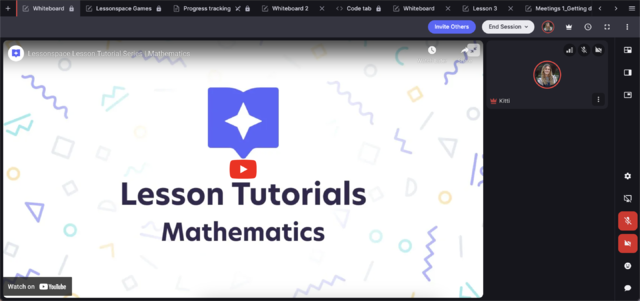
How it works: Use the YouTube embed tool to load videos directly into the space. You can learn how to do this in our YouTube embeds guide.
Why we love it: Watching videos that are embedded inside Lessonspace makes playback smooth. It means you can watch videos together without switching between tabs, sharing your screen, or battling with permissions.
4. Use templates for repeatable lessons
The Tip: Use pre-made templates for inspiration and accessible, interactive resources.
Matthew Henshall, Lessonspace CEO, says, “Templates are one of the most underrated features on Lessonspace.” Creating lesson materials from scratch for every session takes plenty of time, so templates can give you a useful head start.
How it works: Check out our growing library of ready-made templates that you can use in your Spaces. Templates include adjustable and movable elements such as shapes, text, and sticky notes.
Why we love it: Templates let you lead fun, interactive activities instantly without repetitive prep work.
5. Reveal lesson content as you go
The Tip: Cover upcoming lesson content with shapes or blocks, and move them as you progress.
Showing an entire worksheet or wall of text at once can be overwhelming and make it harder for students to focus on what matters. Head of Education, Kitti Bába, commented that she likes doing this especially with younger or distracted students.
How it works: Lay out your full lesson on the whiteboard, but place colored blocks over the answers or sections you aren't ready to discuss yet. When you want to, simply delete or slide the cover shape away to reveal the relevant section.
Why we love it: It keeps attention focused strictly on the current topic and builds natural curiosity about what’s hidden underneath. It helps students stay focused on what you’re working on while adding a little curiosity about what comes next.
6. Use the Resource Library to scale
The Tip: Store, manage, and share a central repository of custom, quality teaching materials for your team using the Resource Library.
For tutoring organizations, maintaining consistent lesson quality across dozens or hundreds of tutors can be a challenge.
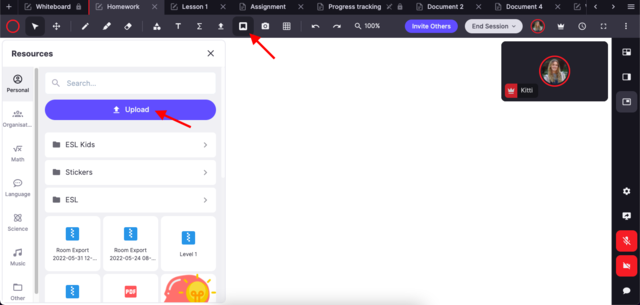
How it works: You can add pre-approved lesson plans, templates, and teaching assets to a centralized Resource Library that is accessible to all your tutors through their Spaces. Learn more about the Resource Library and how to manage it for your tutors.
Why we love it: It gives tutors immediate access to high-quality materials, cuts down individual prep time, and ensures a consistent standard across every lesson. This makes it easier for your business to scale. Attani Sacha Tammathin, Account Executive, says, “It’s a unified and controllable source of resources for their tutors. Makes the number of lessons a business can do far more scalable.”
7. Use the doc tab to plan lessons and track homework
The Tip: Use the built-in document tab and editor to outline lessons, take notes collaboratively, and hand out homework.
While the whiteboard is fantastic for visual and hands-on interaction, the document tab is useful when you need more structure or space for detailed notes. This tip from Matthew Henshall, Lessonspace CEO, is to “use the doc tab at the start and the end of a lesson to set and check homework.”
How it works: Use the doc tab at the start of your lesson to outline the day’s agenda, during the session to take notes, and at the end to leave homework instructions.
Why we love it: It keeps the lesson structured and gives students a simple, accessible summary to review after the session ends. You can revisit the tab at the beginning of the next lesson to review homework and pick up where you left off.
Bonus: Don't forget the fireworks!
If you haven't tried the fireworks button to celebrate a moment of success, you're missing out! It remains our most loved celebratory feature. Emojis in general are a fun way to celebrate your student’s achievements and keep them engaged with the lesson.
Ready to try these out?
Log in to your Lessonspace account (or create a new account to start your free trial) today and try embedding a YouTube video, creating a sticker stack, or hiding a whiteboard clue in your next lesson!