
Changelog
What's New?
A collection of new features we've just launched in Lessonspace!
Upgraded Dashboard
The dashboard has had a new coat of paint applied and some performance improvements under the hood so you should see faster load times as well as a fresh new design on each page!
Mobile Emoji Launcher, CSV Export, Updated Settings Page
Meta
We started this change log where you can track major (and some minor) updates to Lessonspace every month :)
Spaces
Features
The Emoji Launcher is now available on mobile. It can be accessed via the Chat tab by clicking the emoji next to the send button. The Emoji Launcher also received a slight cosmetic update on desktop.
Updates
Users who join a Space without giving permission to their browser to access their webcam and microphone will now be able to see and hear other people in the Space who have published their video and audio feeds. This allows users who do not have a webcam or microphone at all to join and see and hear everyone else publishing their video and audio feeds in the Space.
Added a warning to the top of the window when the size of the Space starts getting too big. This is rare, but when a Space has lots of tabs, or has a tab with a lot of drawings/text on it, this takes up a lot of memory. If the Space gets too big, it can become slow, unstable, or even crash. This warning will let users know when a Space is reaching its capacity and prompts them to delete some unused content to free up some space.
Bug Fixes
Fixed a bug that caused everyone to get muted when the Leader of a Space muted another participant.
Dashboard
Features
Added the ability to export data from the Overview and Session pages as CSV.
Settings pages received a new coat of paint and some minor layout adjustments to make navigating them a little easier. Expect this new aesthetic to roll out over the other pages in the dashboard in the near future.
Bug Fixes
Fixed an issue with a billing alert being displayed when it shouldn’t have been.
Integrations
Updates
Updated our documentation with some additional explanation on different terms as well as adding more clarity to management API authentication.
We made the error messages when an integration attempt with TutorCruncher fails clearer and more informative.
Whiteboard Floating Menu
Spaces
Features
We've launched the Floating Menu on the Whiteboard module which adds some new editing functionality to objects, and reveals the functions that were previously hidden in the right-click (or long-press on touch devices) context menu. This should make it much easier to manipulate objects on tablets and phones especially.

Here are some of the highlights:
- You can now edit the colours of objects (shapes, text, lines etc.). For shapes you can change both the outline and the fill colours independently.
- You can now simply click the Lock button to lock or unlock the selected object. Locking an object prevents it from being moved, scaled, rotated, or deleted.
- You can use the Duplicate button to make a copy of the selected object.
- You can easily re-arrange your objects by using the Bring Forward or Send Backwards buttons.
- When selecting a graph or equation generated by the Equation Tool, you can click the Edit Equation button to open up the editor. Double-clicking them still works though, if you're used to that!
One caveat to be aware of is that Floating Menu currently only works on single-item selections. It will not show when selecting more than one object at a time. We plan to support this in the future.
Updates
Improved the performance of uploading images to a Space. If an image fails to upload for any reason (due to a poor connection, packet loss, etc.) it will be automatically retried several times before failing completely.
Bug Fixes
Fixed a bug where the UI would jump around when you open or typed in the chat on mobile devices.
Dashboard
Features
You can now customise your billing details on your Lessonspace invoices under the Billing tab on the Settings page.
On the Sessions page you can now filter results to show only sessions that are currently in progress.
Bug Fixes
Fixed a bug with Space Settings not updating or reverting to defaults correctly.
Language Selector, Moodle Plugin, Developer Docs Update
Meta
We made #5 Product of the Day on ProductHunt on Saturday. We were hunted out of the blue by none other than #1 Product Hunter and the literal inventor of the hashtag, Chris Messina. Needless to say, being a Saturday, we were not prepared, but it was a nice surprise. You can check out the post here: https://www.producthunt.com/posts/lessonspace
Spaces
Features
You are now able to change language inside of Spaces thanks to the new Language Selector. See it in action:

Pro and Advanced customers will still be able to set the default language of their spaces, but now language will also be automatically adjusted to match the user's browser settings if their preferred language is supported.
At the moment we support English, French (Canadian), Italian and Polish. We are working on adding new languages soon. If you'd like to request a specific language or contribute, please let us know via support@thelessonspace.com.
Updates
To coincide with the new language selector, our hotkey hints got a little upgrade to make them more language-agnostic.
Dashboard
Features
Our Moodle plugin was approved for Beta access. If you're a Moodle user, try it out and let us know what you think: https://moodle.org/plugins/mod_lessonspace. Version 1.0 will be live soon!
Updates
We've updated our Developer Documentation with a new look and clarified some of the explanations. We're working on some more improvements to make it even easier to integrate. We'd like to keep improving this documentation all the time so feel free to send us any suggestions you may have.
We added the ability to disconnect from integrations and connect to new ones seamlessly. Previously this was something you'd have to request us to do, so it's a lot faster!
Video Layout Modes
Meta
This edition of the Lessonspace changelog was a bit delayed because we were busy finishing up one of the biggest and most anticipated updates ever: Video Layout Modes. Read more about it below.
Spaces
Features
Video Layout Modes are here! Now, in addition to the original Floating Video Mode, you have 3 additional layout modes to choose from:
- Sidebar Mode: the new default mode that stacks videos neatly to the side of the workspace. No more fiddling around with the size of videos to see the content!
- Grid Mode: the standard layout you'd be familiar with from other video conferencing tools is now available in your Spaces, for when the content on the page is less important.
- Present Mode: when you need to bring attention to a particular person's webcam feed or shared screen, double-click (or double-tap) it to open it up nice and big, with all the other videos shrinking to the side or the bottom.
When you activate Leading Mode, all participants will change layout with you, so you can direct their focus as needed. If you share your screen while leading, your feed will automatically be presented to everyone else. Deactivating Leading Mode will switch everyone back to their original chosen layout.
For a more thorough breakdown, check out this video:
Updates
Along with Video Layout Modes come a lot of visual and layout improvements. The Comms Dock is now docked to the right-hand side of the screen, and the Chat window got a facelift and now opens up in its own area, no longer covering videos.
Floating Menu will now show up on right-click as well as left-click to better mimic how the old context menu used to show up on Whiteboard tabs.
Simultaneous Screen Sharing and Webcam Feeds
Meta
The Lessonspace product team has grown by one this month as we welcome Mark to the team. With some extra hands we'll be able to start shipping both major features and minor updates and improvements at a faster rate than before, so there's a lot to look forward to in the coming months.
Spaces
Features
As we mentioned in our last update, simultaneous screen sharing and webcam feeds are now available on Lessonspace! What this means is when you share your screen, a separate video feed is created in the space to display your screen, rather than just replacing your webcam feed.
If you are in Leading Mode and start to share your screen, your shared screen feed will be the video that gets automatically presented, with your webcam feed moving to the sidebar.
Dashboard
Updates
- Upgraded all date/time values to display timezone data when relevant.
- Updated the copy to be clearer on the Lock Space dialog.
- Fixed some issues with the search filter not applying properly on Sessions page.
Participants Panel, Shapes, Space Auth
Meta
We've got loads to share in this update with regards to new features and updates, but also our home and feature pages got a much overdue update, which now details a lot more of the features available to you in Lessonspace. Check them out!
Spaces
Features
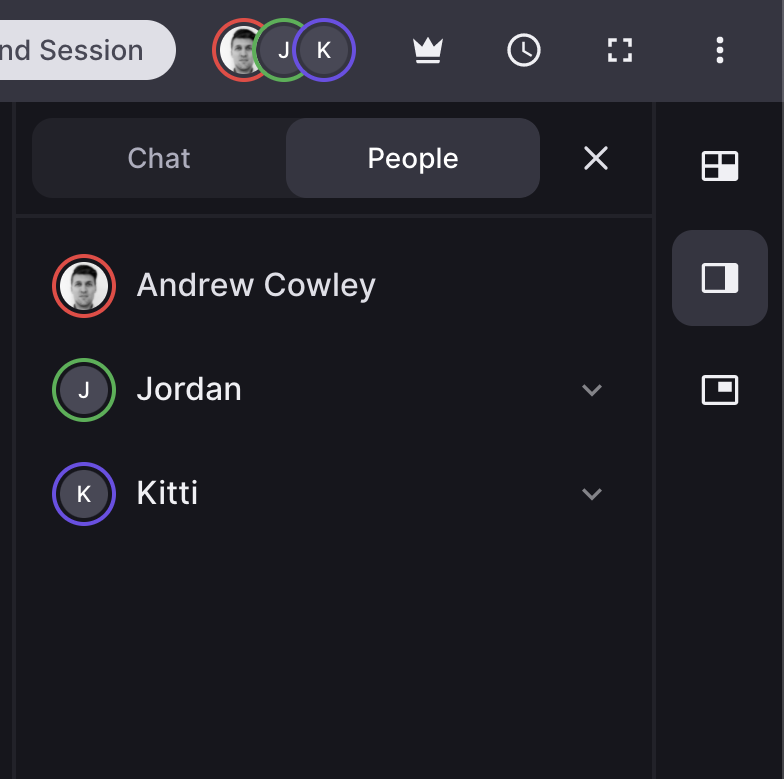
New Participants Panel
We introduced a new participants panel for viewing and managing people (as a leader) in a Space. This is part of a larger project that is in the works to support more people in a Space. Watch this, uh ...space.

New Shapes & Line Tools
On the shapes tool in the Whiteboard tab we introduced the much requested right-angle triangle, as well as arrow and dotted line tools.
Updates
General
- Tooltips were rebuilt to be much more performant and consistent between devices.
Audio/Video
- Switching between video layouts is now significantly smoother. Previously videos may have cut out for a second or two before being restored, but now switching layouts should have basically no effect on the video feeds.
- Manipulating floating videos is now much smoother, and fixed a bunch of edge cases where videos would not appear in floating mode.
- The yellow border around videos to indicate when someone is talking now properly does not show up when the person has muted their microphone.
- The talking indicator has a higher required threshold to activate, so it does not show up as often when someone isn't actually talking.
- The "poor connection" indicator is now more accurate and should show a lot less often on more stable connections.
Whiteboard Tabs
- Draw Tool and Highlighter cursors have been updated to show the size and colour that will be applied when you draw.
- You can now hold alt while dragging an object on the whiteboard to copy it.
Document Tabs
- Fixed an issue in Document tabs where copied text did not keep the size formatting when pasted.
Dashboard
Features
Space Authentication We introduced an updated gateway for entering a Space. Now, when joining a Space, you will be given the option to enter your name (as usual), or log in using your email address (if you are not already logged into Lessonspace).
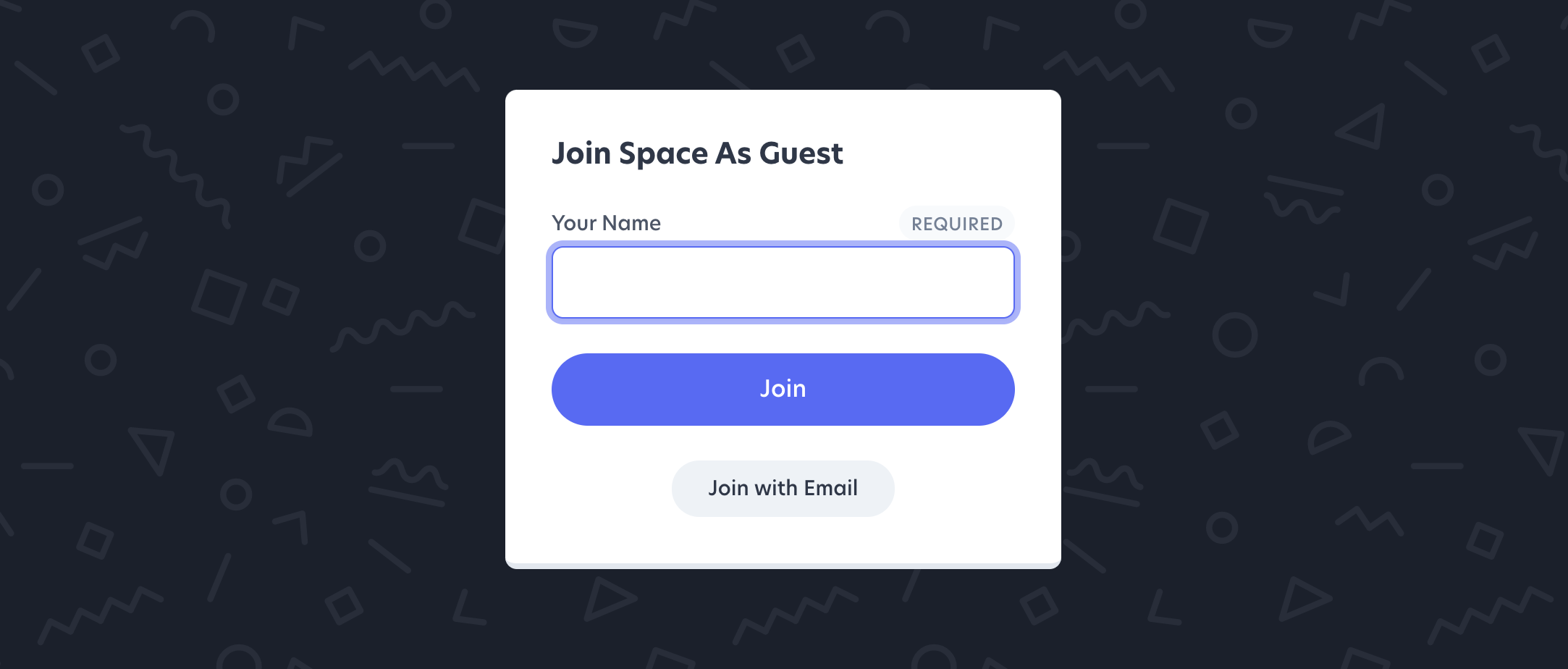
Choosing to log in with an email will do one of two things: If you don't have a profile on the account that owns the space, it will create a student profile for you on the account OR if you already have a profile on the account that owns the Space, it will prompt you for your password.
If you don't remember your password, fear not! We also automatically send you an email with a magic link to join the space immediately, as well as a single-use code (called a One Time Pin, or OTP) which you can enter into the password field to join as an alternative.
Updates
- Filter options on listing pages like Spaces, Sessions, Students, and Teachers, are now preserved when you navigate between viewing individual items and the list itself.
- The copy and labels on the Space locking interface were updated to be easier to understand.
- Choosing a display preference (between grid or rows) on the Spaces page will now persist between sessions.
- Timestamps now display with their timezone to help make them a bit clearer.
New & Improved Background Tools, Spanish Translations
Meta
A smaller update this month as the team is hard at work on several large features that are planned for release in Q4. Check out the Roadmap to see what's coming up!
Spaces
Features
New & Improved Background Tools
We introduced a bunch of new background options via the "Change Background" tool on the Whiteboard module. Watch this clip to see what's new, or read below for the full breakdown.

- 3 Background Colours: the existing white and black is now joined by beige.
- 4 Overlay Styles in 3 Sizes: the existing graph paper overlay is now joined by lines, a dot grid, and standard lined grid overlays, all available in 3 different sizes each.
- 3 Overlay Colours: each overlay can be switched between 3 different colours: blue, grey, or black/white depending on the background colour.
Updates
Languages
- ¿Hablas Español? We've added Spanish language translations just for you!