September 30, 2026
The Ultimate Guide to Teaching Online with Lessonspace
)
Great online tutoring involves so much more than simply joining a video call. It requires the right combination of technology, classroom management, and pedagogy. Tutors should be technologically skilled, well-trained, and able to motivate students. This guide breaks down everything you need to plan, host, and deliver online lessons that keep students learning and engaged.
1. Set up for success
Before diving into lesson plans, your technical foundation must be solid, and you must be comfortable with the tools you plan to use. This includes your hardware, your internet connection, and your supporting equipment.
Use a desktop or laptop computer rather than a tablet or mobile device for maximum stability. Modern Mac or Windows systems with updated browsers perform best.
Both you and your student should have a reliable internet connection to ensure that your sessions run smoothly.
Make sure you have suitable equipment, such as a webcam, microphone, and speakers, to conduct your sessions effectively. Clear audio is non-negotiable. Invest in a wired headset with a noise-cancelling microphone. Position your camera at eye level, and place a soft light source in front of you.
Ready to transform your virtual classroom? Sign up for a free trial of Lessonspace and explore tools built specifically for teaching great lessons online.
2. Plan strong lessons
Lesson planning is an essential part of teaching, and a well-designed plan can make a significant difference to student learning outcomes. Here are some key ways to create engaging lesson plans that set your online classroom up for success:
Begin with the end in mind: Design your lesson with a clear understanding of what you want your students to learn, and make sure all activities help you achieve this. These objectives should be specific and measurable. These lessons can be planned out daily or weekly, depending on your preference.
Promote interactivity: Plan activities that actively engage students, using resources like games, puzzles, and role-playing. Encourage group work to foster social interaction, teamwork, and communication skills.
Keep the structure: While flexibility is important, make sure you also keep a structured overview of the lesson content and planned activities. This helps you stay on track and cover all key points.
Reuse previous plans: Draw inspiration from successful past lesson plans and adapt them to current classes; this can save time and continuously improve your teaching approach.
Understand prior learning: Stay updated on students' prior learning to avoid unnecessary repetition, ensure progression, and design lessons that challenge and engage all learners. Remember to accommodate different learning styles, abilities, and preferences.
Incorporate seasonal schemes: Use holidays and seasonal events to create themed lessons that pique students' interest. As an example, here are our Halloween Scattegories, Virtual Christmas Tree, and Easter Egg Hunt templates. Making lessons relatable to students' everyday experiences enhances their motivation and understanding of the subject's relevance.
Your lesson prep checklist
Test all your tech: Make sure your computer, camera, and microphone are working correctly. It's better to catch technical issues before the lesson starts.
Technical Plan B: Have a backup plan for possible technical problems. This could be as simple as having a spare headset nearby, or having mobile data to use in case of WiFi outages.
Review your lesson plan: Be sure you're clear about what you're teaching and the resources you'll be using. If this includes digital resources, test them ahead of time to ensure they work properly.
Lesson Plan B: Just like a backup plan for your devices, make sure you have additional resources available for your lesson, such as games or extra practice materials, in case the scheduled lesson is completed quickly or some students work faster than others.
Upload your files in advance: To save time during the lesson, upload and set up your files in advance.
🔥 Lessonspace tip: Use the Resource Library to store your files. This is a quick way to access them on the whiteboard.
3. Manage your virtual classroom
Managing a classroom of students online presents unique challenges, but good time management and communication will help it run smoothly.
Punctuality and timekeeping
Punctuality and timekeeping are vital aspects of successful online teaching. When you show up on time for your classes and manage your time efficiently during the lesson, it reflects professionalism. It also allows for a structured, seamless lesson flow.
Here are some ways to manage time well:
Prepare ahead of time: Be prepared with all your lesson materials, tests, quizzes, and setup before the session begins. Anticipate technical glitches and plan your responses so you don’t waste valuable teaching time.
Design your schedule prudently: Steer clear of back-to-back classes. Short intervals in between help you relax, transition smoothly from one lesson to another, and reflect on the previous class's successes and improvements.
Leverage timers: Using timers during your lessons can guide you to stay on track and maintain a balanced focus on various topics. They can be particularly useful during individual tasks or activities.
Communicate your expectations
Clear rules and expectations keep lessons orderly and respectful and let students know what they should do.
Have clear online rules: Set out simple rules for online sessions. These could be things like keeping the camera on, muting when not talking to limit background noise, and always being polite during the sessions. This blog explores virtual classroom rules and expectations if you want some more tips for setting rules.
Set expectations about work: Make sure your student knows what they should do for each session. This could include preparing before a session, doing homework on time, and actively taking part in the session.
Create an online lesson guideline: Make a short, fun guide about online etiquette. You can show this at the start of each session or send it to the student before you start tutoring them.
Constant reminders: Remind your student about these rules at the start of each session or when you're introducing new topics or ways of learning. This helps the student remember them and makes the session more respectful and efficient.
Address issues quickly: If a student doesn't follow the rules, talk to them about it straight away and privately. This shows that the rules are important for a good learning environment.
4. Create an engaging online classroom
An online learning environment needs to address both the emotional and intellectual aspects of learning in order to be engaging for the students.
Ensure a welcoming and inclusive virtual classroom
Co-create respectful interaction norms with students to foster shared ownership.
Express enthusiasm, passion, and empathy to make your teaching presence tangible.
Gauge understanding through frequent interactions, non-verbal cues (eye contact, gestures), and open feedback.
Provide notes and lesson recordings so students can focus on active listening rather than note-taking.
Vary your vocal tone, pace, and pitch to hold attention and avoid monotony.
Leverage real-world examples
Connect abstract concepts to practical, relatable scenarios (e.g., teach percentages using discount calculation scenarios or use the biography of a famous person for a reading exercise).
Use case studies and materials that resonate with students' daily experiences and personal interests.
Boost student engagement with interactive tools
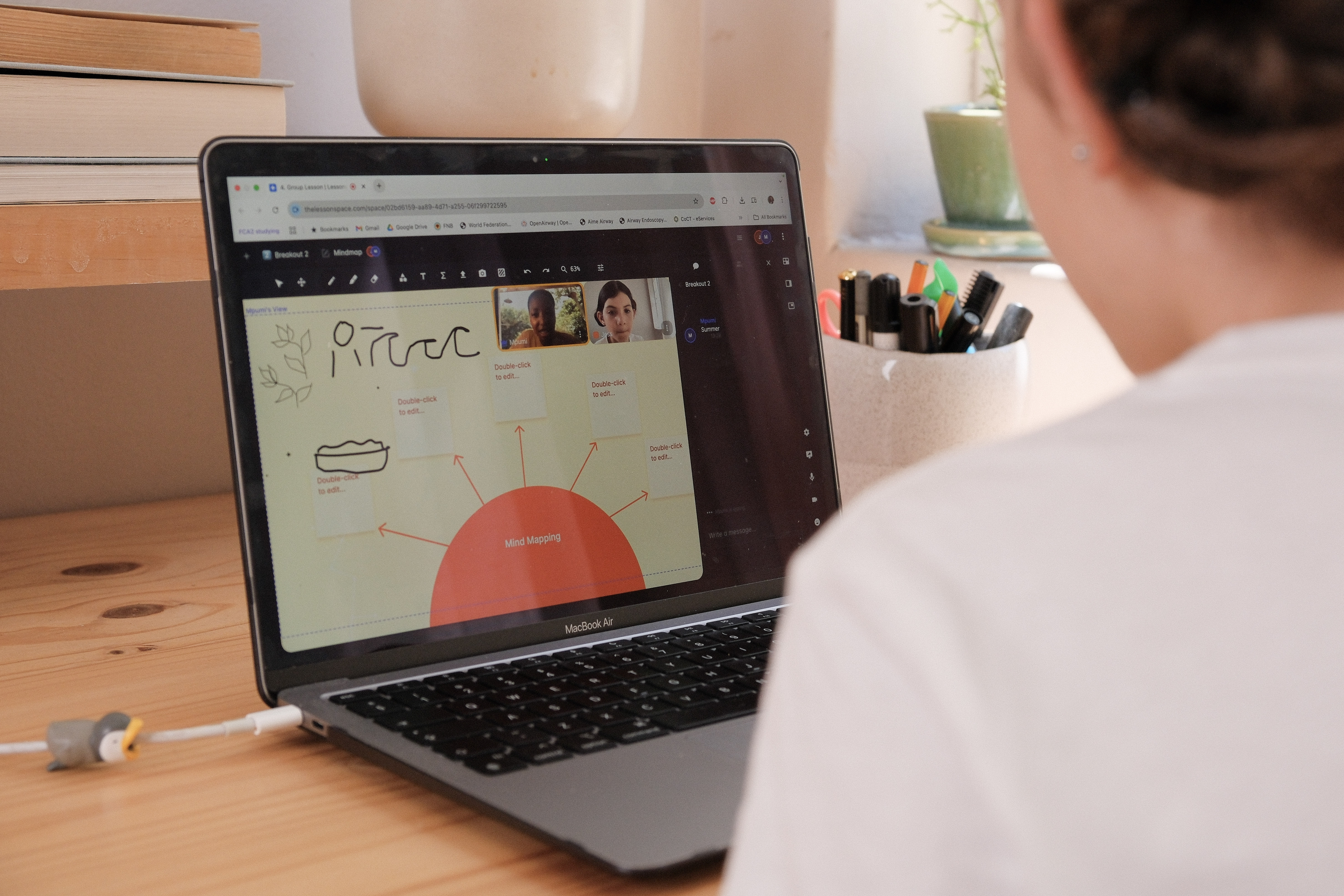
Incorporate live polls, quick quizzes, gamified tasks, and interactive whiteboards for continuous, active participation. Quizlet and Kahoot! are good options for quizzes and interactive activities for your lessons.
Utilize visual aids (diagrams, charts, slides) to break down complex ideas.
Master virtual tools like screen sharing and digital whiteboards to present information seamlessly.
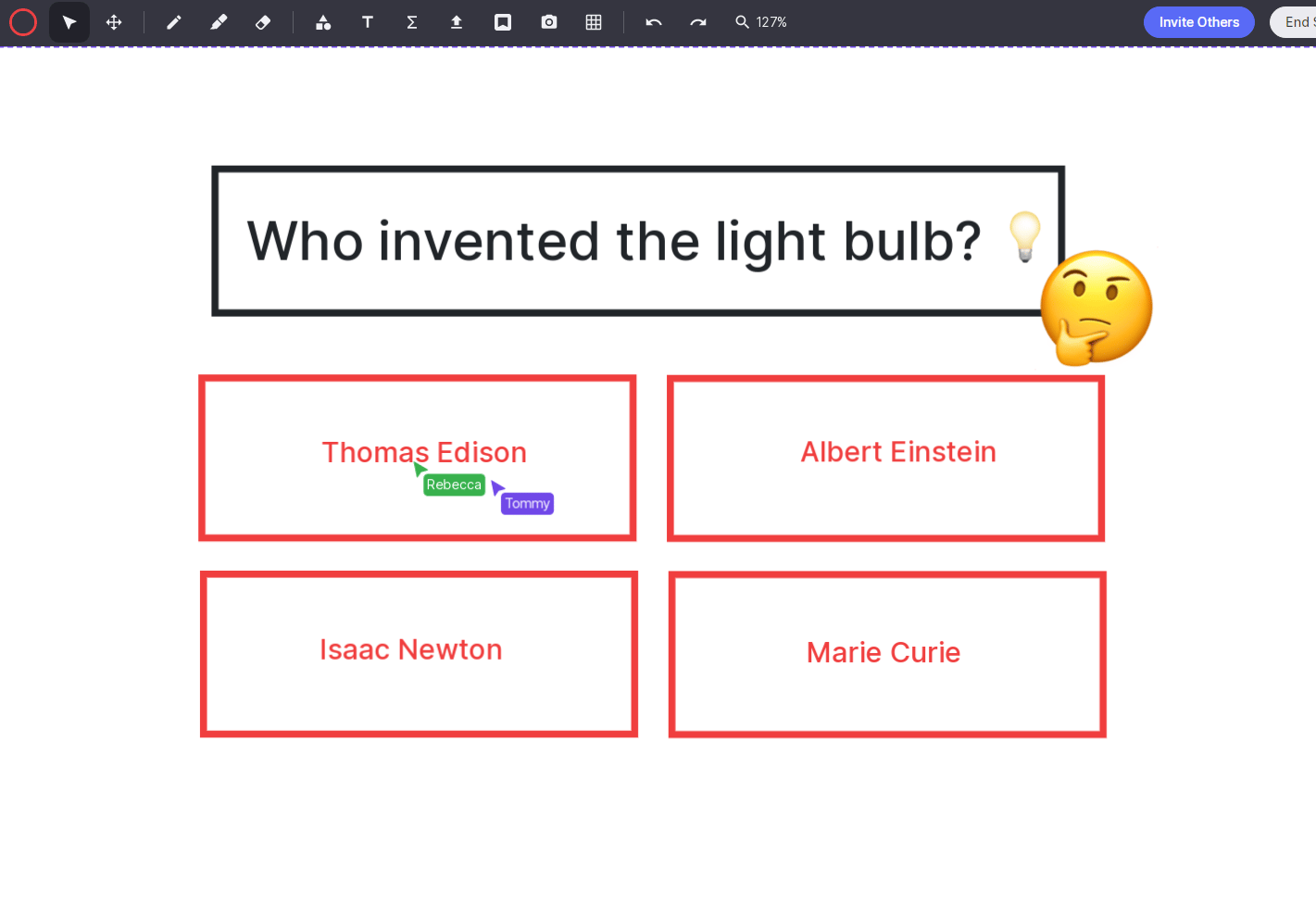
🔥 Lessonspace tip: Set up a quick quiz on Lessonspace by adding a question to the whiteboard and asking students to provide their answers in the chat or on the whiteboard.
As an ESL tutor, one of my favorite cool-down activities is a picture game. In this game, students have to ask yes-no questions to guess what's in the picture. You can upload the picture on Lessonspace and hide it with a solid square, revealing it only once the students have guessed what it is. This activity is perfect for younger learners, and it can be adapted to other subjects as well.
Kitti Bába, Head of Education at Lessonspace
Optimize your Talk-Time Ratio
Aim for a student-centric ratio (e.g., 30% Teacher Talk Time / 70% Student Talk Time) to boost engagement and retention.
Reduce monologue time by using open-ended questions that stimulate critical thinking and deep discussion.
Facilitate active speaking opportunities through student presentations, group tasks, and peer-to-peer dialogues.
Focus on conversation quality and ensure student talk time is meaningful, purposeful, and structured.
Manage larger classes effectively
Use tech features (interactive whiteboards, digital hand-raising, reaction emojis) to keep large groups involved without losing the personal connection or structure.
Incorporate small-group tasks with assigned roles and clear communication channels to foster community and mutual support.
Track student participation to ensure equal contribution opportunities (e.g., calling on quieter students, letting individuals write on the whiteboard).
Set explicit guidelines early regarding participation, respectful conduct, and deadlines to keep lesson structure.
5. Promote active learning
Collaboration encourages active learning, and a perk of online classrooms is that they provide numerous opportunities for collaboration.
Interactive whiteboard
The more students can interact, the better. They can draw, connect ideas, or add related images to the board. Interactivity is key to "horizontal learning," which ensures that the students are on the same level as the tutor.
Further reading: Explore some of the Lessonspace team’s best whiteboard hacks
Balance group and individual work
Group activities encourage students to interact, exchange ideas, and solve problems collaboratively. This boosts teamwork and enhances critical thinking skills. In collaborative projects, students not only learn the subject matter but also essential skills like project management, teamwork, and conflict resolution.
On the other hand, individual work promotes personalized, self-paced learning, and it doesn't have to be a solitary activity. As a tutor, you can bring a collaborative element into individual tasks. For example, while students work individually, intermittently engage them in discussions about their approach, ask them to elaborate on their solutions, or provide guidance where needed. This way, even during individual tasks, a level of collaboration is maintained, and you ensure active learning with continuous engagement.

Peer reviews and feedback
Peer reviews allow students to learn from one another and deepen their understanding of the subject matter. During peer review sessions, students provide feedback on each other's work, which helps them to reflect on their learning and improve their work based on constructive criticism.
🔥 Lessonspace tip: To promote open communication and allow students to ask questions asynchronously, add a whiteboard labelled "Idea Time" to your Space. This gives students the ability to write their questions, ideas, or concerns on the board.
Use multimedia
Multimedia resources cater to diverse learning styles and can make complex concepts more accessible.
Videos: These present information in a dynamic and visually appealing way. They can be used to demonstrate procedures, narrate events, or visualize abstract concepts. They can also provide additional explanations or alternative perspectives on the content you are teaching. Khan Academy and TED-Ed are some great resources for videos.
Podcasts: Auditory learners will appreciate an engaging format like podcasts to explore class content. They can be used to present interviews, discussions, lectures, or stories related to your subject. Podcasts can be an excellent resource for students to learn while on the go.
Infographics: Combine visual elements and text to represent information in a concise and visually appealing way. They can be used to simplify complex information, summarize key points, or visualize data.
Simulations: Allow students to explore real-world scenarios in a controlled, virtual environment. They can be used in various subjects, from simulating chemical reactions in science to role-playing historical events in social studies.
6. Set and measure learning objectives
Well-defined objectives help you and your students understand what is expected to be achieved or demonstrated by the end of a lesson, semester, or course.
Here are some practical ways to set and measure learning objectives in your online teaching:
Be specific: Clearly articulate what students should know, understand, or be able to do. Use specific and measurable language that describes the desired learning outcomes. For example, instead of asking "What is photosynthesis?" you can say "Explain the process of photosynthesis, including its key components and role in plant growth."
Align with standards or curriculum: This helps provide a clear framework and ensures that your students are meeting the necessary expectations. If you work for an organization or tutoring company, ask them to provide frameworks or curricula.
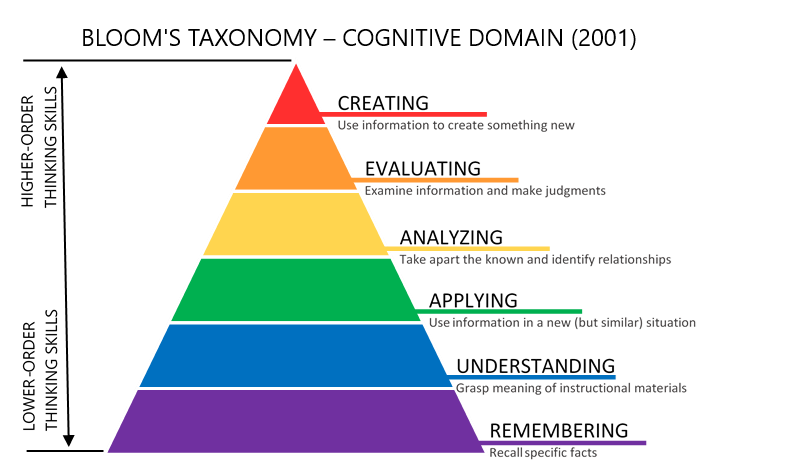
Consider Bloom's Taxonomy: Refer to Bloom's Taxonomy, a framework that categorizes learning objectives based on cognitive complexity. It offers a hierarchy of cognitive processes, ranging from lower-level skills such as remembering and understanding to higher-level skills such as analyzing, evaluating, and creating.
Use the action verbs from Bloom’s taxonomy to describe the desired actions or behaviors, and incorporate action verbs into your learning objectives. Examples of action verbs include analyze, evaluate, solve, create, or compare. These verbs help specify the level of cognitive engagement expected from students, preparing them for higher education or the workforce.
Use rubrics and checklists: These assessment tools provide clear guidelines and help maintain objectivity when evaluating student work. Rubrics can be particularly helpful when assessing subjective or open-ended assignments.
Provide opportunities for self-assessment: Encourage students to reflect on their progress and evaluate their learning against the objectives. Offer self-assessment tools or prompts that guide students in evaluating their work. This promotes metacognition and empowers students to take ownership of their learning process.
Regularly monitor and adjust objectives: Continuously monitor student progress and assess whether the learning objectives are being effectively met. Adjust and refine the objectives as needed to better support student learning and address any gaps or challenges that arise.
🔥 Lessonspace tip: To help students monitor their progress over time, track their assessment results in a Lessonspace document tab. Be sure to lock this tab to prevent students from accidentally altering or deleting their progress.
What are the different evaluation methods?
Formative assessment provides continuous feedback during the learning process using quizzes, discussions, and short assignments to help guide instruction. In contrast, summative assessment measures overall achievement at the end of a course through online exams, final projects, and digital portfolios.
To encourage deeper reflection and active participation, educators also incorporate peer and self-assessment strategies. Peer assessment builds critical thinking and collaboration through group projects, peer-led discussions, and structured feedback forms. Meanwhile, self-assessment uses learning journals, evaluation checklists, and goal-setting activities that empower students to track their own growth and learning.
FAQs
How do I set up my tech correctly?
General setup
Use a computer rather than a mobile device or tablet for a more stable and reliable connection.
Close any unnecessary applications to free up system resources and reduce the risk of performance issues.
Verify that your device meets the minimum system requirements for the online classroom software.
Update any outdated operating systems or browsers, as these may cause issues with your online classroom software.
Always read the online classroom software's requirements
Most modern devices already have a built-in camera and internal microphone, so you don't need to purchase additional devices. However, for the best experience, consider investing in a good-quality, noise-cancelling earphones or headset, a quality camera, and optionally, an external drawing or graphics tablet.
Internet Connection
Use a wired connection if possible, as it is typically more stable than a wireless connection.
Check your internet speed using an online speed test tool to ensure you meet the minimum requirements for the online classroom software.
Avoid downloading or streaming content during your lesson, as this can cause buffering and connectivity issues.
If you live with others in the household, ask them not to download or stream content while you are having an online lesson, as it may slow down your connection.
Audio and Video Setup
Clear audio and video are essential for effective online teaching. Here are some tips to optimize your audio and video setup:
Allow your browser to access your camera and microphone. This is essential, as most online software can only use your camera and microphone with your permission.
Use (wired) headphones or earphones to minimize background noise and improve sound quality.
Position your camera at eye level to ensure a clear view of your face.
Check that your microphone and webcam are plugged in, enabled, and configured correctly.
If available, use advanced noise cancellation in the online classroom.
To improve the quality of your webcam video, consider using a lamp on your desk or clipped to your monitor to brighten your face. For an even more professional appearance, you may want to tidy up your background or use a blurred or virtual background.
How do I handle different personality types?
When teaching any subject, whether online or offline, you may encounter various personality types among your students. Here are some practical tips for handling different personalities in an online lesson:
Introverted students: Provide opportunities for individual reflection and participation, such as through written assignments or private chat discussions. Respect their need for quiet time and create a supportive environment that encourages them to share their ideas comfortably.
Extroverted students: Embrace their energy and enthusiasm by incorporating interactive group activities and discussions. Give them opportunities to express themselves verbally and encourage collaboration with their peers.
Quiet or shy students: Create a safe and inclusive space where quiet or shy students feel comfortable contributing. Use icebreakers and smaller group sessions to help them build confidence. Provide positive reinforcement for their contributions, no matter how small.
Energetic or restless students: Engage energetic students by incorporating movement or physical activities into your lessons. Break up longer tasks into shorter, more manageable segments. Encourage their participation by giving them specific roles or responsibilities during group activities.
Challenging or disruptive students: Address challenging behavior promptly and privately, using a calm and supportive approach. Set clear expectations for behavior and provide specific feedback on their actions. Consider using positive reinforcement strategies and involving parents or caregivers if necessary.
I have experience teaching students with special educational needs, behavioral issues, dyslexia, and ADHD. Since each student is different, finding what works may take some trial and error. For example, one of my very active students with ADHD (age 10) loved exercises that involved movement, even though our lesson was online. When teaching colors (ESL), I would ask this student to quickly find something in their room with each color. Combining movement with learning seemed to work well for this student.
Kitti Bába, Head of Education at Lessonspace